|
|
|
|||
|
Home | Troubleshooting | Quick Setup | Cisco How to | Data Recovery | Forums | Blog | IT Exam Practice | Services | About Us | Chicagotech MVP | Search | Contact Us | |
|
How to setup DFS redundancy in Windows 2008
1. Run Server Manager.
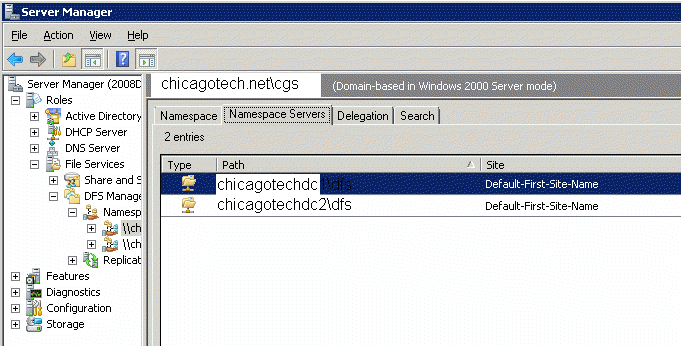
2. Navigate Roles>File Services>DFS Management>Namespaces.
3. Click the server Namespace you want to create redundancy, chicagotech.net\dfs in our case.
4. Click Namespace Servers.
5. In the left pan, click Add Namespace server. Type the server name and click OK.
6. Now, you should have two servers host the same name space.
7. To make sure you have the namespace setup correctly, use net view command to check the status of the name server, for example net use \\chicagotechdc1 and net use \\chicagotechdc2.
Post your questions, comments, feedbacks and suggestions Related Topics
|
|
|
This web is provided "AS IS" with no warranties.
Copyright © 2002-2018
ChicagoTech.net,
All rights reserved. Unauthorized reproduction forbidden.