|
|
|
|||
|
How to disable SBS Group Policy
In some cases, you may want to disable group policy for a test or troubleshooting. In this example, we will describe how to disable SBS Windows Firewall policy.
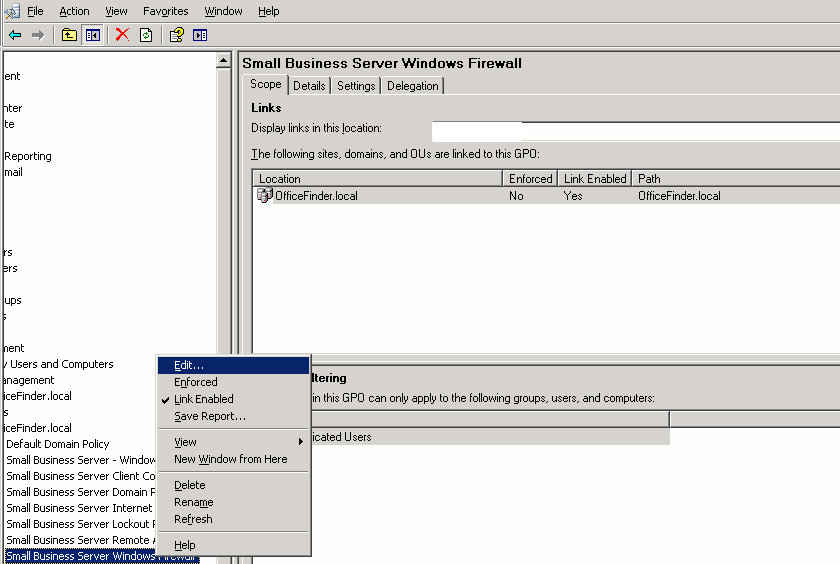
1. Server Management, navigate to Advanced Management>Group Policy Management>>Forest>domain>yourdomainname>Small Business Server Windows Firewall. Right click and select Edit.
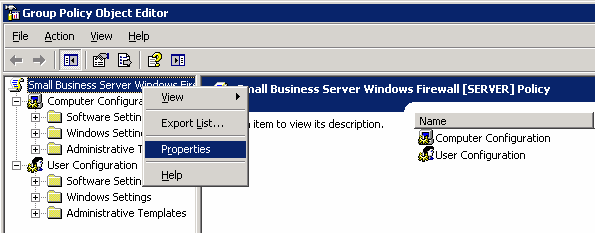
2. In the Group Policy Object Editor, select Properties.
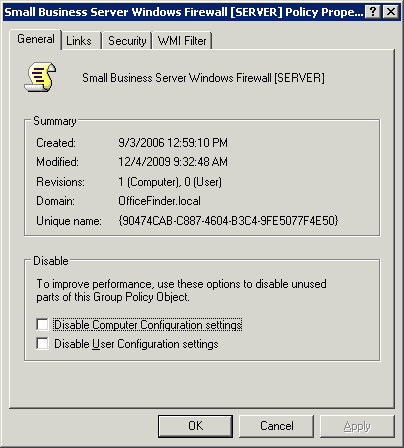
3.In the General tab, check Disable Computer Configuration settings and/or Disable User Configuration settings.
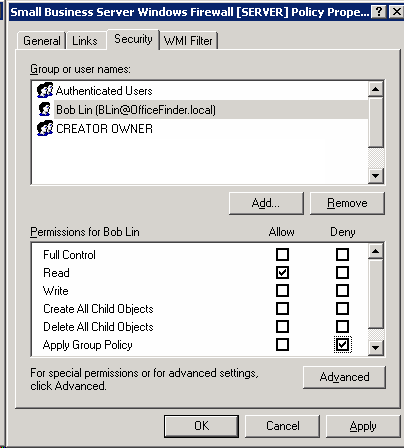
4. If you want to deny the policy to a user or group users, you can select Security. Highlight the user or group, and then check Deny in Apply Group Policy.
Post your questions, comments, feedbacks and suggestions Related Topics
|
|
|
This web is provided "AS IS" with no warranties.
Copyright © 2002-2018
ChicagoTech.net,
All rights reserved. Unauthorized reproduction forbidden.