|
|
|
|||
|
How to import PST file to Outlook
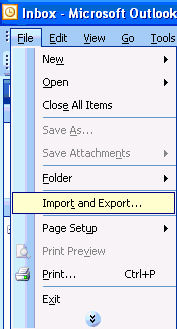
1. Run Outlook. 2. Click File>Import and Export.
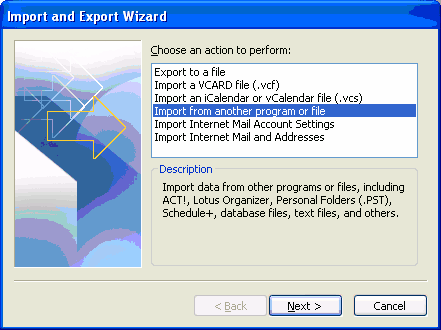
3. Highlight Import from another program or file and click Next.
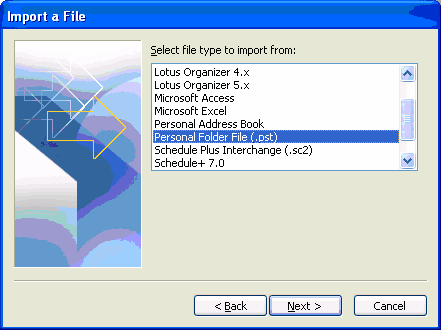
4. Highlight Personal Folder File (.pst) and click Next.
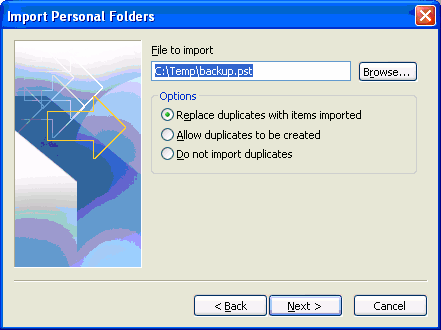
5. Browse the PST file and click Next.
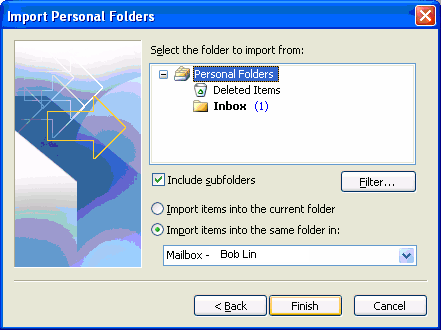
6. Check the options accodingly and click Finish to complete the import.
Post your questions, comments, feedbacks and suggestions Related Topics
|
|
|
This web is provided "AS IS" with no warranties.
Copyright © 2002-2018
ChicagoTech.net,
All rights reserved. Unauthorized reproduction forbidden.