|
|
|
|||
|
Home | Troubleshooting | Quick Setup | Cisco How to | Data Recovery | Forums | Blog | IT Exam Practice | Services | About Us | Chicagotech MVP | Search | Contact Us | Chicago Area Laptop for rent: $35 per day plus $10 for additional day |
|
How to Use Windows System
Restore
1. To use the System Restore Wizard, make sure you're logged on as an administrator.
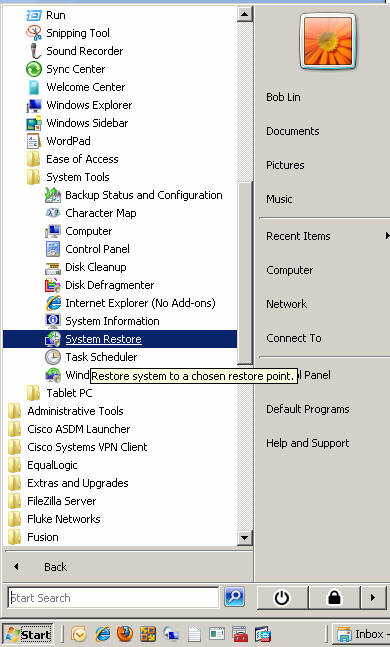
2. Click Start, point to All Programs, point
to Accessories, point to System Tools, and then click
System Restore.
Post your questions, comments, feedbacks and suggestions Related Topics How to access BIOS https://youtu.be/OhW-4TpP7sM Boot in Windows 10 Safe Mode by interrupting the startup process three times https://youtu.be/Fwb8LegdnPU How to boot into Windows 10 Safe Mode in black screen https://youtu.be/v_QZU7BVrtc
Clear install Windows 10 using installation media
|
|
|
This web is provided "AS IS" with no warranties.
Copyright © 2002-2018
ChicagoTech.net,
All rights reserved. Unauthorized reproduction forbidden.