|
|
|
|||
|
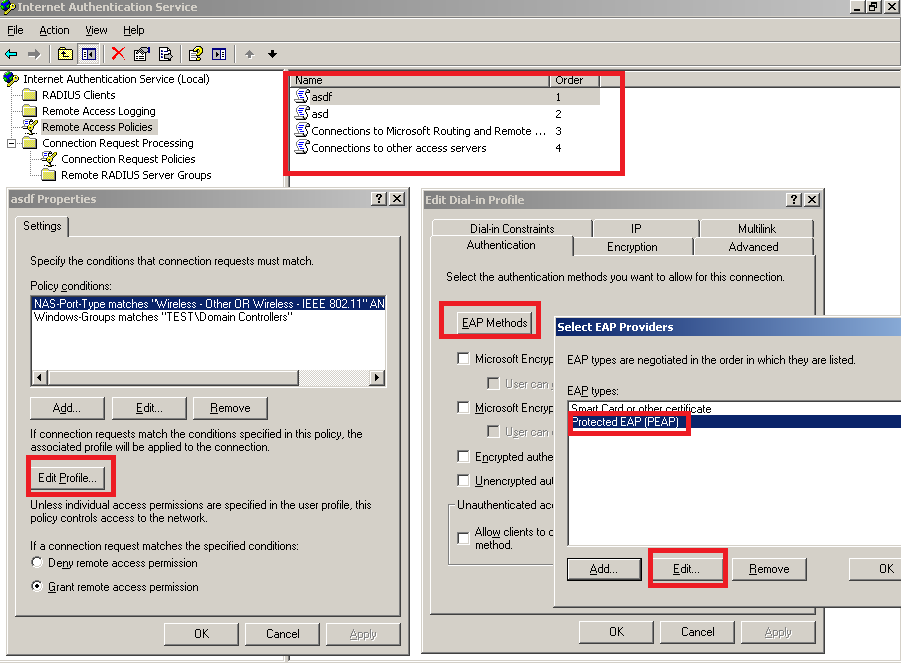
How to add a certificate to RADIUS Remote Access Policies In our example, we will add go Daddy Certificate to RADIUS Remote Access Policies. Open the “Internet authentication service” > click “Remote access policies” > right-click the policies one by one, and click properties > click “Edit Profile” > in the new windows, please click “Authentication” > click “EAP Method” > click “PEAP” > click “Edit”. Please type the “Go Daddy certificate” We should replace it in every listed policies.
Post your questions, comments, feedbacks and suggestions Related Topics
|
|
|
This web is provided "AS IS" with no warranties.
Copyright © 2002-2018
ChicagoTech.net,
All rights reserved. Unauthorized reproduction forbidden.