|
How to Create a Group for Print Shares
A. Create an IP Address resource
7. This next screen will show the Possible Owners that can own the group.
Leave
both nodes as Possible Owners and choose the Next button.
8. For an IP Address resource, we do not need any dependency, so click Next
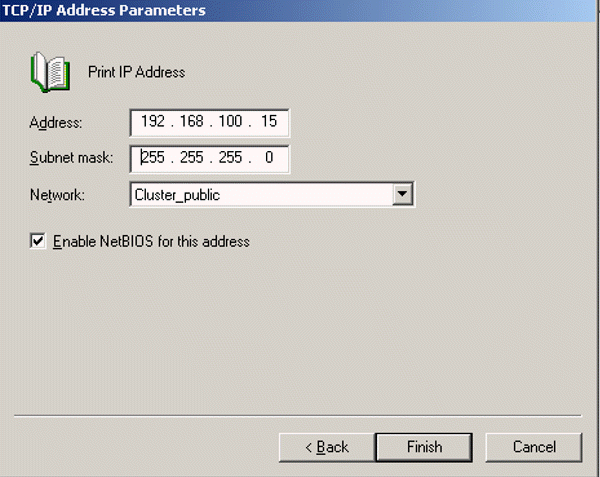
9. In the IP Address box, input the IP Address we will be using of
192.168.100.15.
10. Hit the TAB key on the keyboard and the subnet mask will be filled in for
you.
11. For the Network to Use, select the Cluster_public.
12. Make sure to select Enable NetBIOS for this address so that the network
name
can be bound to the IP Address.
13. Click Finish button, then Ok
14. Right mouse click on the newly created resource and bring it online.
Note: You now have a new IP Address bound to this node. This IP Address is
ping’able and can failover to another node in the cluster. This is the IP
Address that
will be resolved to by WINS / DNS for client connectivity.
Previous Next
Post your questions, comments, feedbacks and suggestions
Contact a consultant
Related Topics
|
