|
How to exclude a user from Loopback policy - Step by step with screenshots
Q: We create a Loopback policy for our windows 2008 r2 RDS. It works fine.
However, we also want to deny this policy to some users. If I select a user
and check Deny in
Apply this group in the Security, the Computer policy still applies to the
user.
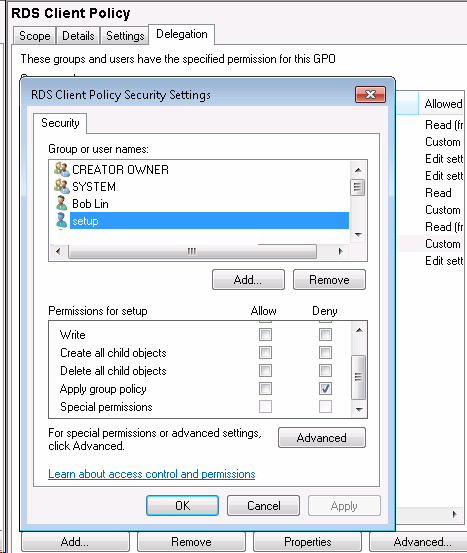
This is the result of the gpresult.
COMPUTER SETTINGS
------------------
Last time Group Policy was applied: 5/20/2013 at 4:11:00 PM
Group Policy was applied from: 2008DC
Group Policy slow link threshold: 500 kbps
Domain Name: DOMAIN
Domain Type: Windows 2000
Applied Group Policy Objects
-----------------------------
RDS Client Policy
Default Domain Policy
The following GPOs were not applied because they were filtered out
-------------------------------------------------------------------
WebHawk AD
Filtering: Disabled (GPO)
Local Group Policy
Filtering: Not Applied (Empty)
USER SETTINGS
--------------
Last time Group Policy was applied: 5/20/2013 at 4:11:36 PM
Group Policy was applied from: 2008DC
Group Policy slow link threshold: 500 kbps
Domain Name: DOMAIN
Domain Type: Windows 2000
Applied Group Policy Objects
-----------------------------
Default Domain Policy
WebHawk AD
Local Group Policy
The following GPOs were not applied because they were filtered out
-------------------------------------------------------------------
Vircom Addin Client
Filtering: Denied (Security)
RDS Client Policy
Filtering: Denied (Security)
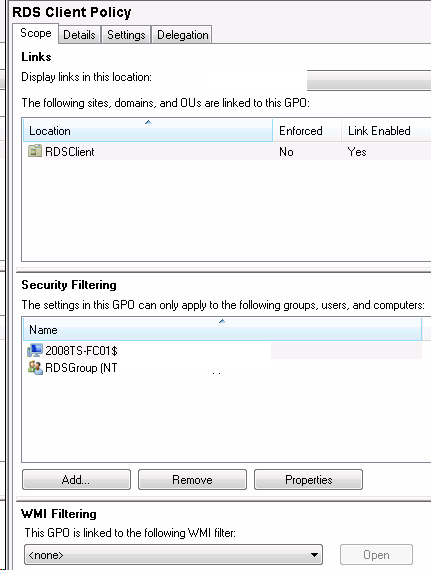
A: For Loopback policy, adding the user you don't want the Loopback
policy applies to and checking Deny doesn't excludes the user from Loopback
policy. You have to remove the default Authenticated Users and added the
specific group and computer in Security Filtering under Scope.
Post your questions, comments, feedbacks and suggestions
Contact a consultant
Related Topics
|

