|
|
|
|||
|
Home | Troubleshooting | Quick Setup | Cisco How to | Data Recovery | Forums | Blog | IT Exam Practice | Services | About Us | Chicagotech MVP | Search | Contact Us | Chicago Area Laptop for rent: $35 per day plus $10 for additional day |
|
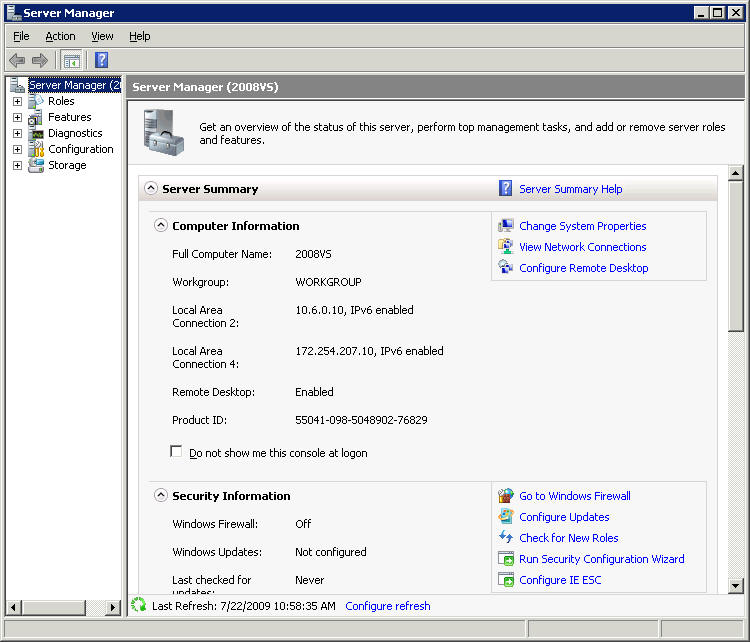
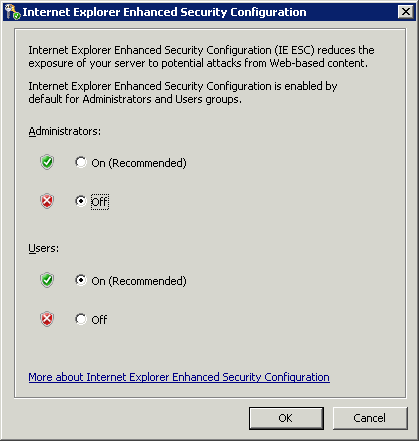
How to disable Internet Explorer Enhanced Security Configuration on Windows 2008 1. Open Server Manager b. 2. Click the top item in the tree to the left Server Manager c. 3. On the page that appears, click on Configure IE ESC in Security Information
4. To turn off ESC accordingly.
Post your questions, comments, feedbacks and suggestions Related Topics
|
|
|
This web is provided "AS IS" with no warranties.
Copyright © 2002-2018
ChicagoTech.net,
All rights reserved. Unauthorized reproduction forbidden.